Markdown tables: build one visually or paste it from a spreadsheet
Pipe tables are the part of Markdown people most often stop writing by hand. Quiline gives you a grid to fill in, converts an Excel or Google Sheets selection on paste, and reopens any existing table for editing, then writes plain, portable Markdown that renders anywhere.
Excel selection to Markdown table, without leaving the editor or uploading the data.
Paste a table from Excel, Google Sheets, or Numbers
Copy a range in the spreadsheet, then paste into the editor. Quiline reads the clipboard's table payload (the HTML flavour that spreadsheets put there, or the tab-separated fallback) and opens the table grid pre-filled with your rows, with the first row treated as the header. Confirm and it lands in the document as a standard Markdown pipe table.
Quoted cells containing tabs, line breaks, or quotation marks are unwrapped correctly, merged cells across columns are expanded into empty cells, and a paste that is not tabular is left alone as ordinary text. Large selections are capped at 200 rows and 50 columns.
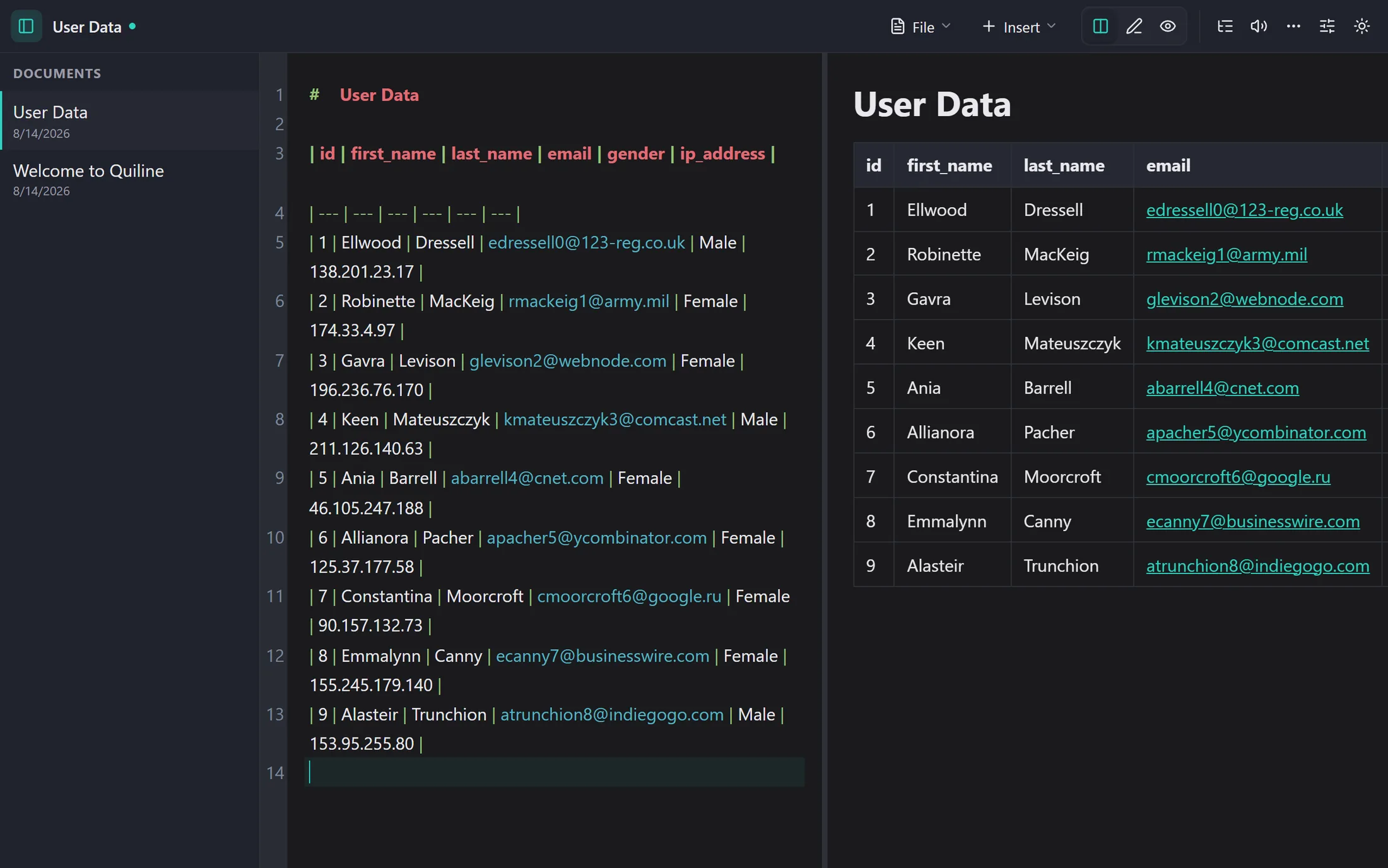
What lands in the document: padded pipe syntax on the left, rendered table on the right.
Build a table in a visual grid
Choose the size, type into cells, set alignment per column. The table modal is keyboard-driven: Tab moves through the cells and grows the table by a row when you reach the end, Ctrl+↓ and Ctrl+→ add a row or a column, and Ctrl+Enter inserts. Quiline writes the pipes and the alignment row for you, padded so the raw Markdown stays readable.
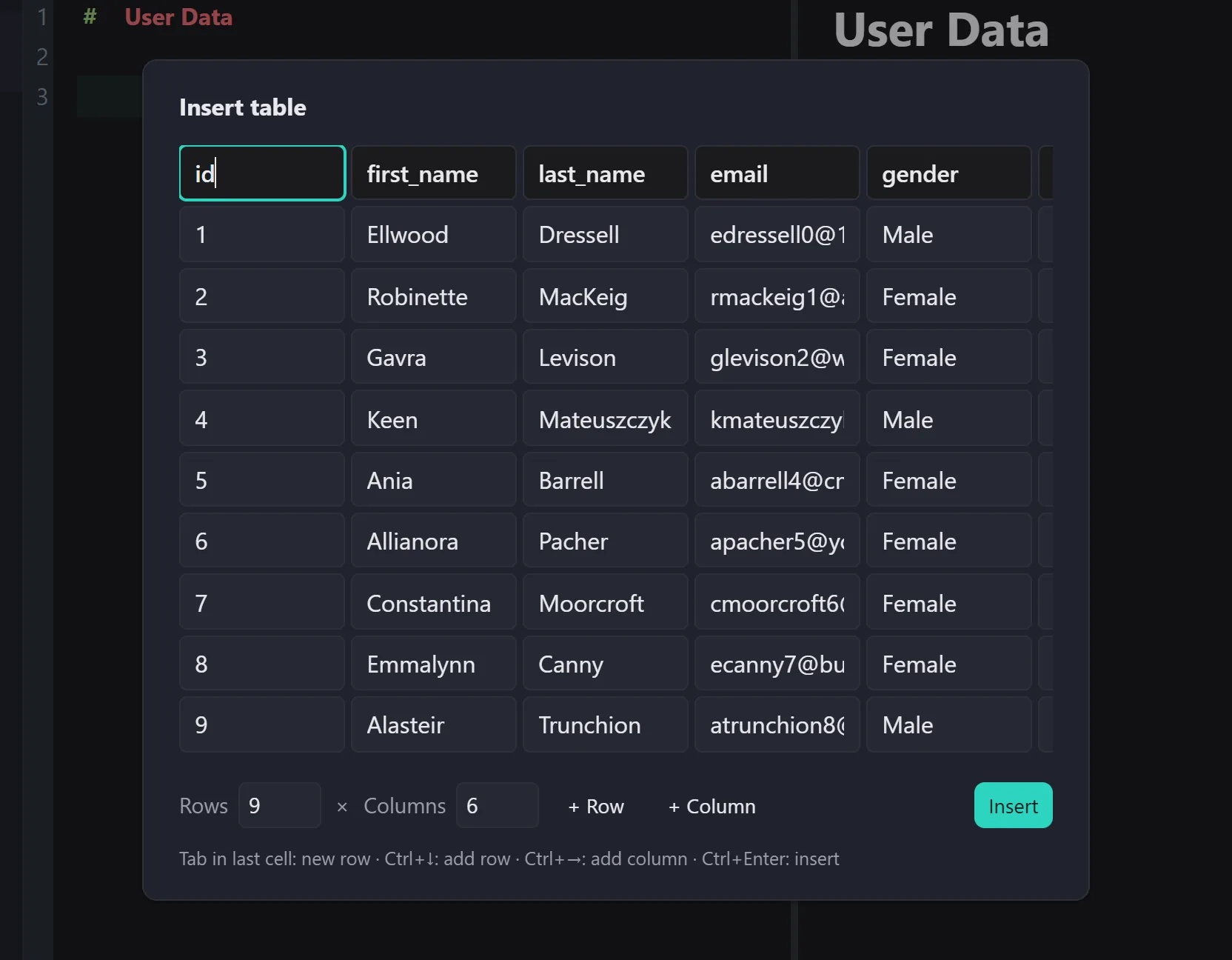
The grid after a spreadsheet paste: nine rows, six columns, editable before anything is written to the document.
Edit a table you already have
Put the cursor in an existing pipe table and reopen the grid. The table is parsed back into cells, so a correction does not mean re-aligning pipes by hand or rewriting the row. This works on tables written elsewhere too, as long as they use standard GitHub-flavoured pipe syntax.
Put the cursor in a pipe table and an Edit table button appears on the header row.
Markdown table syntax, briefly
Useful when you want to read or fix a table by hand.
A table is a header row, an alignment row, then body rows. Cells are separated by pipes:
The alignment row controls each column: --- or :--- is left, :---: is centre, ---: is right. Outer pipes are optional and the dashes do not need to line up: renderers only count the columns, so the padding is purely for humans reading the source.
Two rules catch people out. A literal pipe inside a cell must be escaped as \|, otherwise it splits the cell. And a cell cannot contain a line break: use <br> if a renderer allows inline HTML, or keep the cell short. Inline formatting (bold, links, code spans) works normally inside a cell.
Why do it in the editor instead of a converter site
Spreadsheet-to-Markdown workflows compared
Concern
Quiline
Converter sites
Where the data goes
Stays in your browser
Pasted into a page you do not control
Steps
Copy, paste, confirm
Copy, switch site, convert, copy back
Works offline
Yes, after first load
No
Editing it later
Reopen the same grid
Round-trip through the converter
How do I convert an Excel table to Markdown?
Select the cells in Excel, copy, then paste into the Quiline editor. The spreadsheet clipboard is detected and the selection opens in the table grid; confirming inserts it as a Markdown pipe table. Nothing is uploaded; the conversion happens in your browser.
Does the same paste work from Google Sheets?
Yes. Google Sheets, Excel on the web, Numbers, and most other spreadsheets put an HTML table on the clipboard, and Quiline falls back to tab-separated text when they do not.
Can I keep formulas or cell colours?
No. Markdown tables carry text, not spreadsheet formatting. Formula results are pasted as their displayed values; colours, borders, and merged-cell layout are dropped, with column merges expanded into empty cells.
Is there a row or column limit?
A paste is capped at 200 rows and 50 columns. Beyond that a Markdown table stops being readable in source form anyway, and a code block or an attached file is usually the better answer.
Stop aligning pipes by hand.
The editor is free, needs no account, and works offline once loaded.
 Quiline